Home Assistant has become really big and well-known in the last 3 years, even though the Smarthome Hub has been around since 2013 - at least Home Assistant was first published on Github in 2013. The open source project really took off around 2020, when OpenHAB, ioBroker and Domoticz were the top dogs, along with more manufacturer-bound systems such as Homematic.
In the field of home automation, Home Assistant is a popular and powerful solution and may well be considered the standard in this area today. It is an open source software that aims to unite and control a wide variety of smart home devices from different manufacturers under a standardised interface. This article looks at what Home Assistant is, what options it offers, how it can help save energy and what costs are involved.
What is Home Assistant anyway?#
Home Assistant is an open-source software platform for home automation that is operated locally on its own hardware. The focus is on local control and data protection, which means that the data remains primarily in your own network and is not necessarily dependent on the device manufacturer’s cloud servers. Thanks to its open architecture and a large developer community, Home Assistant supports an immense number of devices and services - from lights and switches, sensors and thermostats to multimedia devices and weather services.
In short, Home Assistant is a coordinator that can unite, control and display very different systems.
What can you do with Home Assistant?#
The core functionalities of Home Assistant include
Integration: It can integrate thousands of devices and services from a wide range of brands. This makes it possible to overcome isolated solutions from individual manufacturers and establish centralised control. Instead of using the respective app for each “smart” device, Home Assistant unites everything under one interface and can therefore control and combine functions across manufacturers, protocols and software. This allows completely different devices to “talk” to each other, creating completely new functions, automations and possibilities.
Automation: The real strength lies in the creation of automation rules. Users can define complex if-then scenarios. Examples of this are:
- Switching lights on automatically when the sun goes down or switching them off when you are away. For example, it is possible to determine whether the residents’ smartphones are logged into the home Wi-Fi, which means they are present. If, on the other hand, no smartphones are logged in, you can deduce that they are absent. To be on the safe side here, motion detectors can be integrated into the automation system. If these have not detected any movement in the house for an additional 15 minutes, there really is no one there - provided you don’t have any large pets.
- Control the heating temperature based on presence, outside temperature or schedules.
- Send notifications when windows are open in the rain or when certain sensors are triggered (e.g. smoke detectors, motion detectors).
- Control multimedia devices or create scenes for home cinema evenings. For example, you can automatically close the blinds and switch on the appropriate TV light as soon as the TV is switched on and it is dark outside.
- Stop the robotic lawnmower when the weather station reports rain, even if it doesn’t have a rain sensor itself. Conversely, you can stop the automatic watering of the lawn when the mower is on the move, even if the systems are from completely different manufacturers.
Control and visualisation: Users can view the status of their devices and control them manually via a web-based user interface (“Lovelace”). Dashboards can be customised to clearly display relevant information and control elements.
Data collection and analysis: Home Assistant can record and visualise sensor data (temperature, humidity, energy consumption, etc.) over time, providing insights into your own home.
Build your own sensors and actuators: With ESPHome, Home Assistant offers an integrated platform with which you can incorporate your own hardware based on ESP microcontrollers, for example.
Examples of mine include the level sensor for our rainwater cistern or my own irrigation controller .Integration of surveillance cameras: With the help of Home Assistant and Frigate , you can make surveillance cameras intelligent so that they can differentiate between humans and animals. This turns the camera into an intelligent motion sensor that only switches on lights when movement is detected by a human.
Predictive maintenance: Surprisingly, this is an area that you don’t read much about in connection with home assistants. If you have door and window sensors, for example, you can also use them to count how often they have been opened and closed. On this basis, you can then send notifications that you should lubricate the hardware.
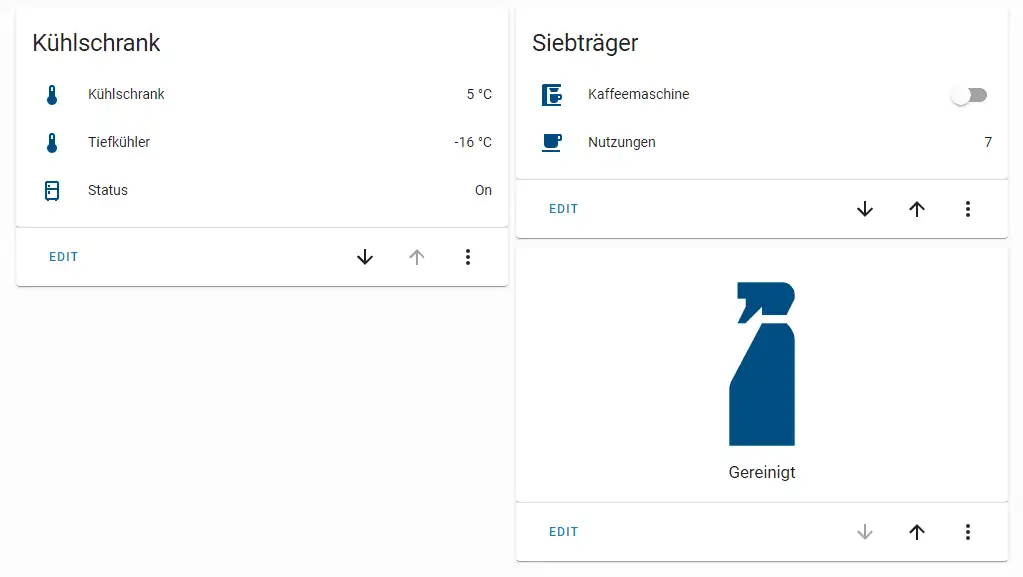
I count how many times my “stupid” portafilter coffee machine has been used (via a smart socket) and receive a notification when I should clean and descale it.
Does Home Assistant help save energy?#
Yes, Home Assistant can be an effective tool for reducing energy consumption in the home, but this requires conscious configuration and appropriate hardware. The potential lies in the following areas:
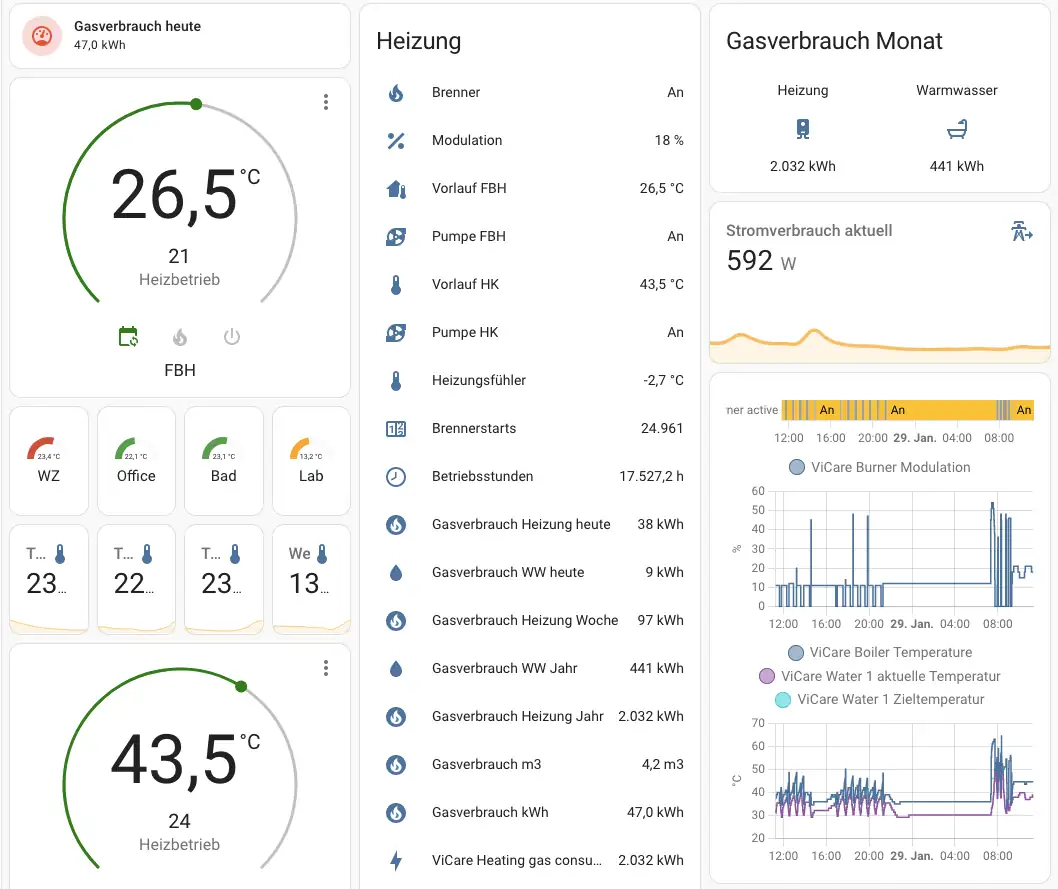
- Intelligent heating control: by linking thermostats with presence detectors, window contacts and schedules, heating can be operated more efficiently. Rooms are only heated when needed and not when the windows are open. Home Assistant can also be used to integrate data from weather services, which can also be incorporated into an automation system.
- Optimised lighting: Automatically switching off lights in unused rooms (via motion detectors) or adjusting the lighting to daylight can save electricity. However, modern LED light sources have such low power consumption that the savings potential here is limited.
- Monitoring energy consumption: Smart sockets with a measuring function or special energy meters can be used to identify “power guzzlers”. Home Assistant can visualise the consumption of individual appliances or the entire household.
- Load management: appliances with high consumption (e.g. washing machine, tumble dryer, electric car charging station) can be specifically activated when electricity is cheap (dynamic tariffs) or when your own photovoltaic system is producing a surplus.
- Standby reduction: Appliances that are not required can be completely disconnected from the mains via smart sockets instead of consuming energy in standby mode. It should also be noted here that some modern appliances consume less standby power than some smart sockets need to operate.
It is important to emphasise that Home Assistant itself does not save energy. It merely provides the platform and the tools to realise energy-saving automation and monitoring. Success depends on the hardware used (sensors, actuators) and well thought-out configuration by the user.
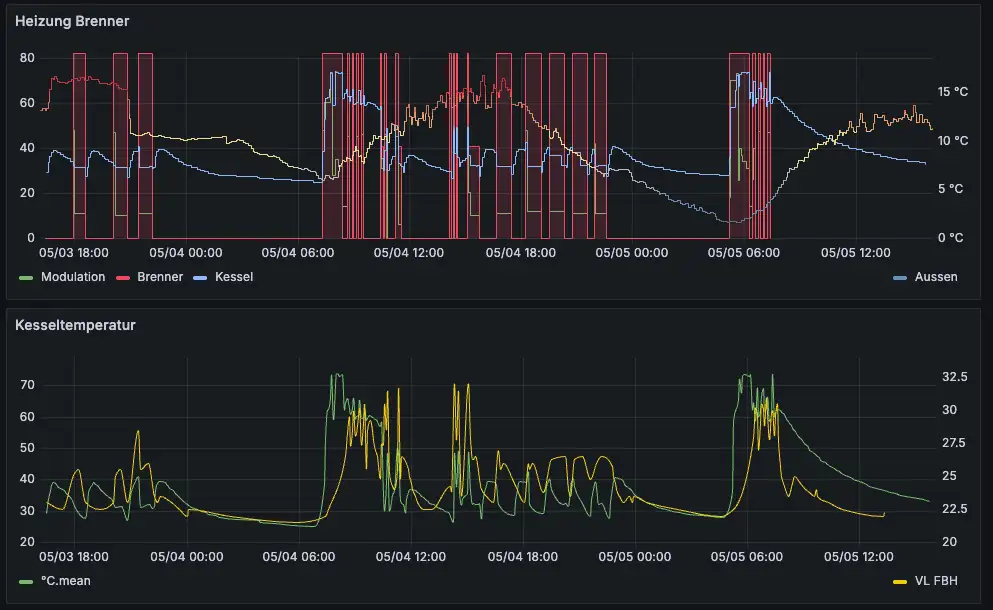
Long-term recording of room temperatures, outside temperature, heating flow and return, heating starts and consumption can be used to draw conclusions about possible optimisations. This includes, for example, really precise hydraulic balancing of the heating circuit. In insulated houses, this often even eliminates the need for individual room control. We don’t have one because our heating regulates itself.
What does Home Assistant cost?#
- The software: Home Assistant is open source and therefore available free of charge.
- The hardware: Home Assistant requires a platform to run on. The costs for this vary greatly:
Raspberry Pi: A popular and relatively inexpensive option (costs vary depending on model and accessories, around €50-100).
Dedicated devices: Manufacturers such as Home Assistant offer optimised hardware (e.g. Home Assistant Green or Yellow, approx. €100-200).
Mini PCs (NUCs) or old laptops/PCs: More powerful, but also more expensive or utilises existing hardware.
NAS systems or servers: Can run as a virtual machine or Docker container if appropriate infrastructure is available.
You can find an overview of possible hardware solutions for Home Assistant, their advantages and disadvantages and my recommendations here: Which hardware should I choose for Home Assistant?
- Optional cloud services: For easy remote access and integration with voice assistants such as Alexa or Google Assistant, the Home Assistant project offers the paid cloud service “Nabu Casa” (currently around €7.50/month or €75/year). This service is purely optional; remote access can also be configured manually. The same applies to the integration of voice assistants such as Alexa.
- Smart home devices: The biggest costs are usually incurred by the purchase of the actual smart home components (sensors, actuators, lights, thermostats, etc.) that are to be integrated into Home Assistant. Here I would like to point out that before purchasing a device, you should make sure that it can be integrated into Home Assistant without any major tricks and that there is an integration for it. If this is not the case, a manufacturer no longer has a chance with me.
- Time! Home Assistant is becoming more and more user-friendly with every new version. Even more complex automations can now be clicked together via the graphical user interface. However, it takes time and desire to learn the basics, as well as technical expertise and the willingness to search for information yourself. The excellent forum also helps, as does the Home Assistant subreddit. However, you can make much faster progress with English language skills and I even consider them to be essential.
Advantages and disadvantages of Home Assistant#
Advantages:#
- High flexibility and customisability: hardly any other platform offers a comparable degree of freedom in the design of dashboards and automations.
- Enormous device support: Integration of thousands of devices from a wide range of manufacturers.
- Open source: No dependence on a single commercial provider, high transparency.
- Local control & data protection: Data remains primarily in your own network.
- Strong community: Extensive documentation, forums and numerous instructions available online.
- No running costs for the core software.
Disadvantages:#
- Training required: Setup and configuration require technical understanding and time. It is not a plug-and-play solution.
- Maintenance effort: Regular updates of the software and integrations are necessary.
- Hardware required: Dedicated hardware must be provided for operation.
- Troubleshooting: Troubleshooting problems can be complex.
- Costs for hardware and devices: Even if the software is free, the costs for the basic hardware and smart home devices can add up.
Conclusion#
Home Assistant is an extremely powerful and flexible smart home centre for tech-savvy users who value control, data protection and independence from individual manufacturers. It offers extensive possibilities for automation and, if configured correctly, can also provide significant support in saving energy.
However, this is offset by a certain amount of familiarisation and maintenance work and the need to provide your own hardware. Home Assistant may be less suitable for users looking for a simple plug-and-play solution. For hobbyists and enthusiasts, however, it is often the preferred choice.